How to Write AI Prompts - Best AI Prompts Examples + Best Practices
A vague prompt gets a vague answer, because the model fills every gap you leave with a guess. We recommend filling the gaps with facts, not adjectives, asking the model to list what it assumed, and checking every claim before it goes out. Ask an AI tool to "write about marketing" and you'll get generic filler back; ask it to write a 200-word product description for a specific audience, in a specific tone, and you'll get something you can actually use. The difference is almost always in how you phrase the request, not which AI tools or AI chatbots you use.
Below are the ingredients of a good prompt, then sample prompts for ads, blog ideas, SEO, social media, images and video.
How to write effective AI prompts
Put facts in the prompt, not adjectives. Words like “compelling”, “engaging” or “eye-catching” tell the model nothing it was not already going to do. Give it what it cannot guess: who the reader is, what the offer is, the one claim you can prove, the limits on length, and the words your brand avoids. Compare “Write a compelling ad for our water bottle” with “Write five headlines of at most 30 characters for [product], aimed at [audience], built around [one claim you can prove], with no exclamation marks.”
Anthropic’s prompting guide suggests a simple check: show the prompt to a colleague who has little context on the task and ask them to follow it. If they would have to come back with questions, so will the model.
End the prompt with “List anything you had to assume because I did not say.” That is where invented details hide, such as a discount, a feature or a tone the model chose for you, and the list shows you what to correct or verify before anything is published.
Show an example of the output you want. The same guide calls examples one of the most reliable ways to steer a model’s output. Keep each prompt together with one output you accepted, and next time paste both and change only the facts.
Say what to exclude. A prompt that only says what you want often gets the safest, most generic version of it: a five-paragraph structure, a summary sentence, a call to action you did not ask for. Naming what to leave out, such as “no bullet points” or “skip the intro paragraph,” removes an entire branch of likely outputs and gets you to a usable draft faster than adding more description of what you do want.
Ask for one task at a time, and correct a draft by naming what is wrong with it, such as “too formal; cut the second paragraph”, instead of rewriting the whole prompt.
Before you paste company data into a prompt
Pasting your own source material gives the best results, so check the plan first. OpenAI says that on Free, Plus and Pro it may use your content to train its models unless you opt out (turn off Improve the model for everyone under Settings, Data controls), while it does not train on ChatGPT Business, Enterprise or API content by default. Whichever tool you use, leave out customer names, contract terms and unreleased numbers unless your company has approved the tool for them.
Sample AI prompts for PPC ad copy
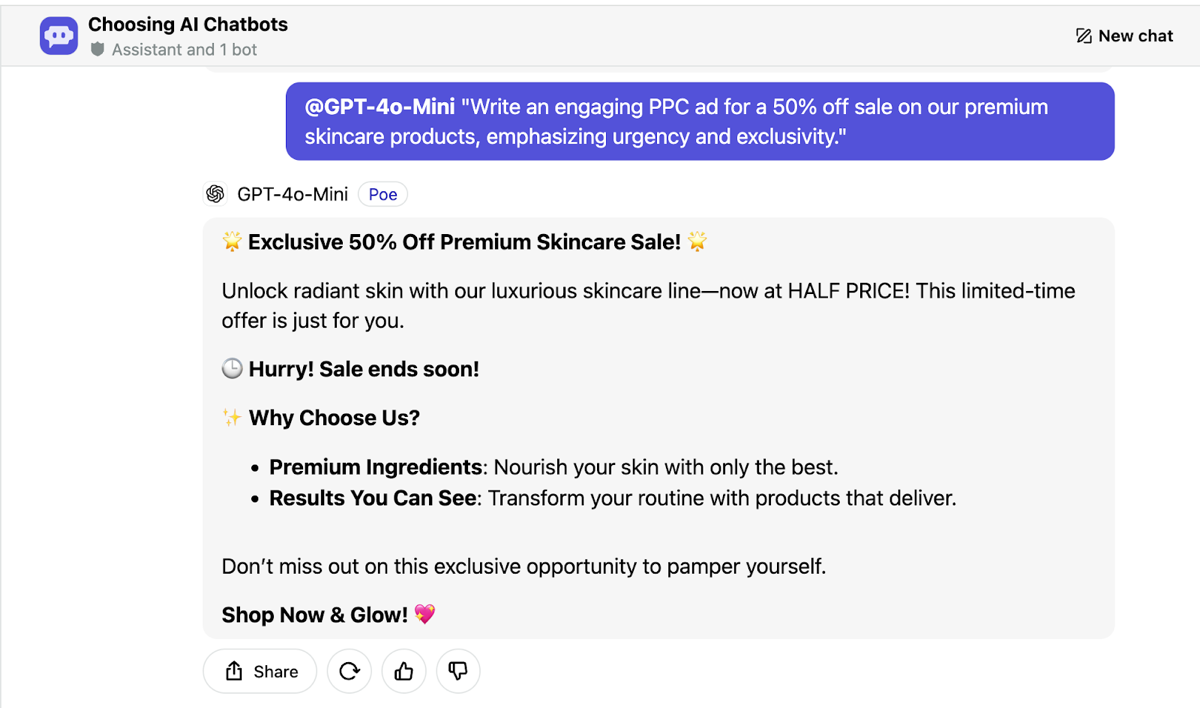
Google Ads responsive search ads take headlines of up to 30 characters and descriptions of up to 90, so put the limits in the prompt, along with the claims you can back. The screenshot shows what an adjective-only prompt returns: a 40-character headline, “Sale ends soon” with no date, and claims about ingredients and results that nobody supplied.
These versions give the model what it was missing:
- Product promotion: “Write five headlines (30 characters or fewer) and two descriptions (90 characters or fewer) for [product]. Audience: [who]. Lead with [one feature] and [one benefit]. No price, no exclamation marks.”
- Limited-time offer: “Write three ad variations for [offer, for example 50% off a product line until a date]. Use only the terms below and add no promise that is not in them: [terms]. Put the end date in the first line.”
- Customer pain points: “Here are five customer reviews of [product]: [paste]. Name the most common frustration people had before buying, and write three headlines that speak to it in the customers’ own words.”
- Competitive advantage: “Write an ad that explains [your advantage] to [audience]. Do not name competitors, and do not use ‘best’ or ‘fastest’ unless I give you proof: [proof].”
Sample AI prompts for blog content ideation
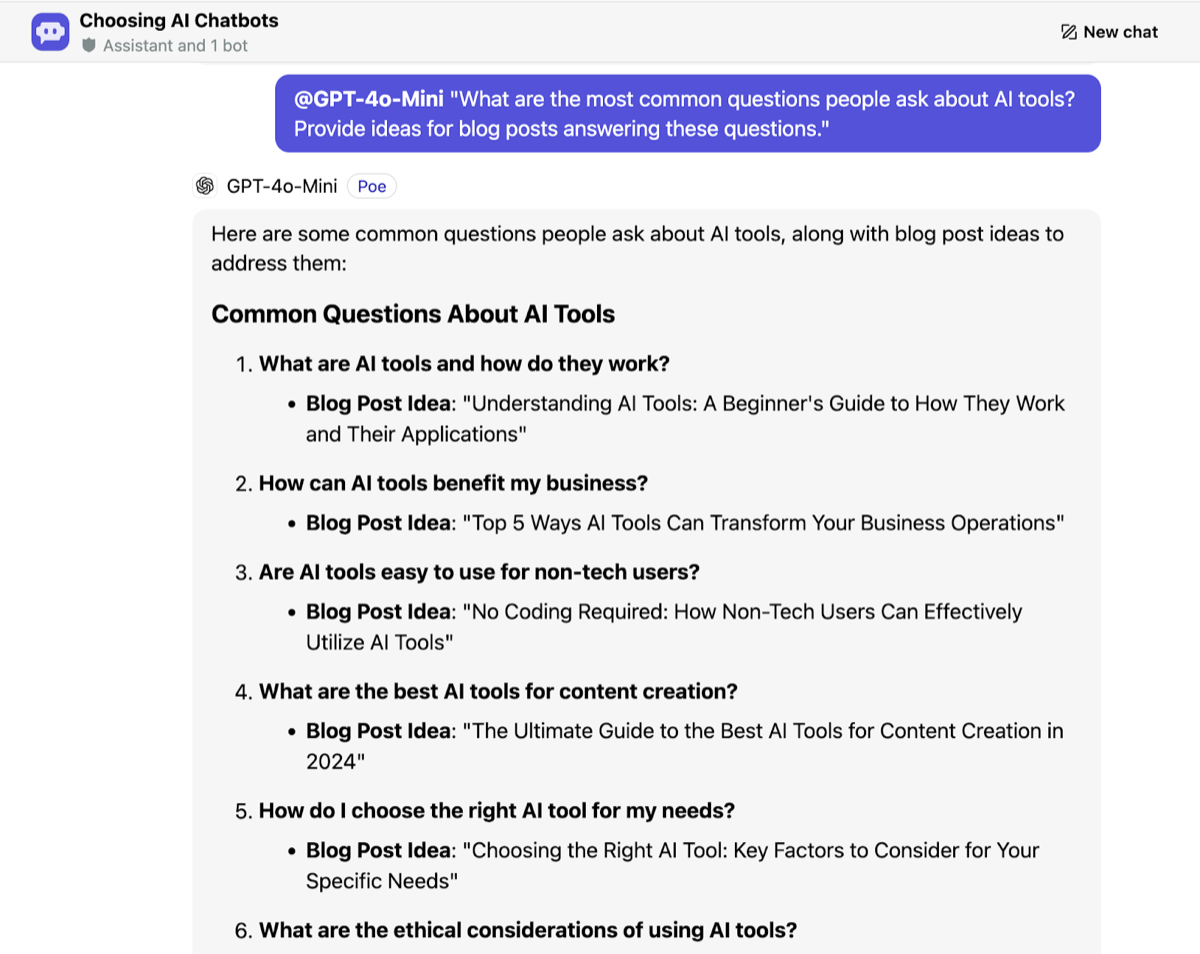
A model that is not browsing cannot see what is trending now, and asked for “the most common questions people ask” it answers from memory. The screenshot shows the result: questions and titles that could sit on any site. Build ideas from your own data instead: support tickets, questions from sales calls and search queries.
- Audience questions: “Here are 30 questions customers asked us last quarter: [paste]. Group them by topic and suggest one blog post per topic, with the question it answers in the title.”
- Problem-solving ideas: “Our readers are [role] at [type of company]. List the five problems they hit in [process]. For each, suggest a post that gives a step-by-step fix, and say what example I would need to add.”
- Comparison posts: “Suggest comparison posts between [tool A] and [tool B] that a [role] would search for. For each, list the three criteria that decide the choice, and flag every fact I must verify on the vendors’ own pages.”
- Myth-busting: “List five common misconceptions about [topic] among [audience]. For each, suggest the kind of source (official documentation, a study, our own data) I should check before writing.”
Sample AI prompts for SEO optimization
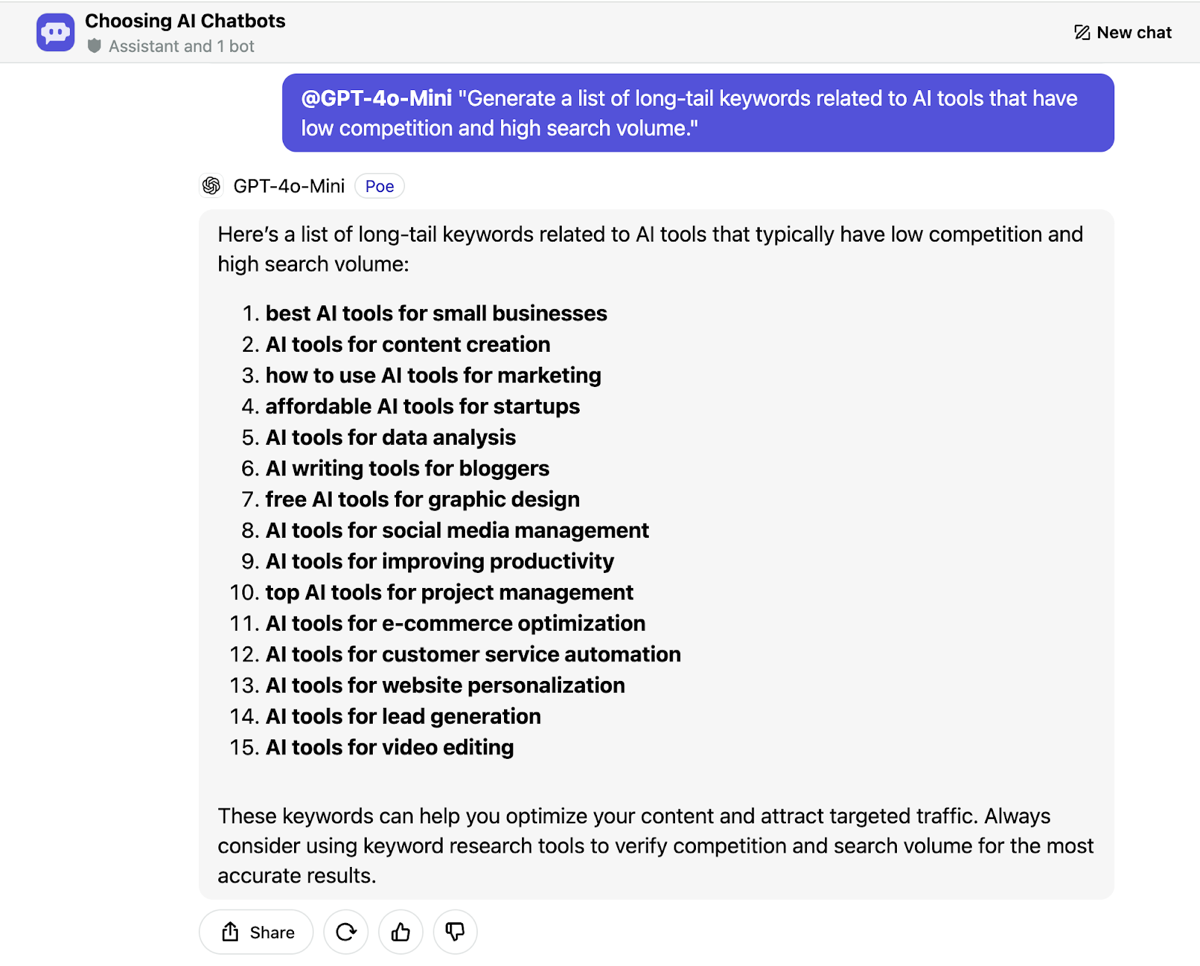
A chat model has no search volume or competition data unless it is connected to a keyword tool, so a prompt for “low competition, high volume” keywords gets guesses. In the screenshot the model returns fifteen keywords and then advises checking competition and search volume in a keyword research tool. Paste your own data, such as an export from Search Console, and ask for the work a model can do: grouping, comparing and rewriting.
- Keyword grouping: “Here are our Search Console queries with impressions and clicks: [paste]. Group them by search intent, name the page that should target each group, and flag groups with no matching page.”
- Meta descriptions: “Here is the page text: [paste]. Write three meta descriptions of about 150 characters that include [target keyword] and say what the reader gets.” Models often miscount characters, so check the length yourself.
- Internal linking: “Here are the titles and URLs of our posts: [paste]. For the post at [URL], suggest up to five other posts to link to, with the anchor text, and explain how each link helps the reader.”
- Content gaps: “Here are our post titles: [paste]. Here are a competitor’s post titles: [paste]. List the topics they cover that we do not, ranked by how closely they relate to [our product].”
Sample AI prompts for social media marketing
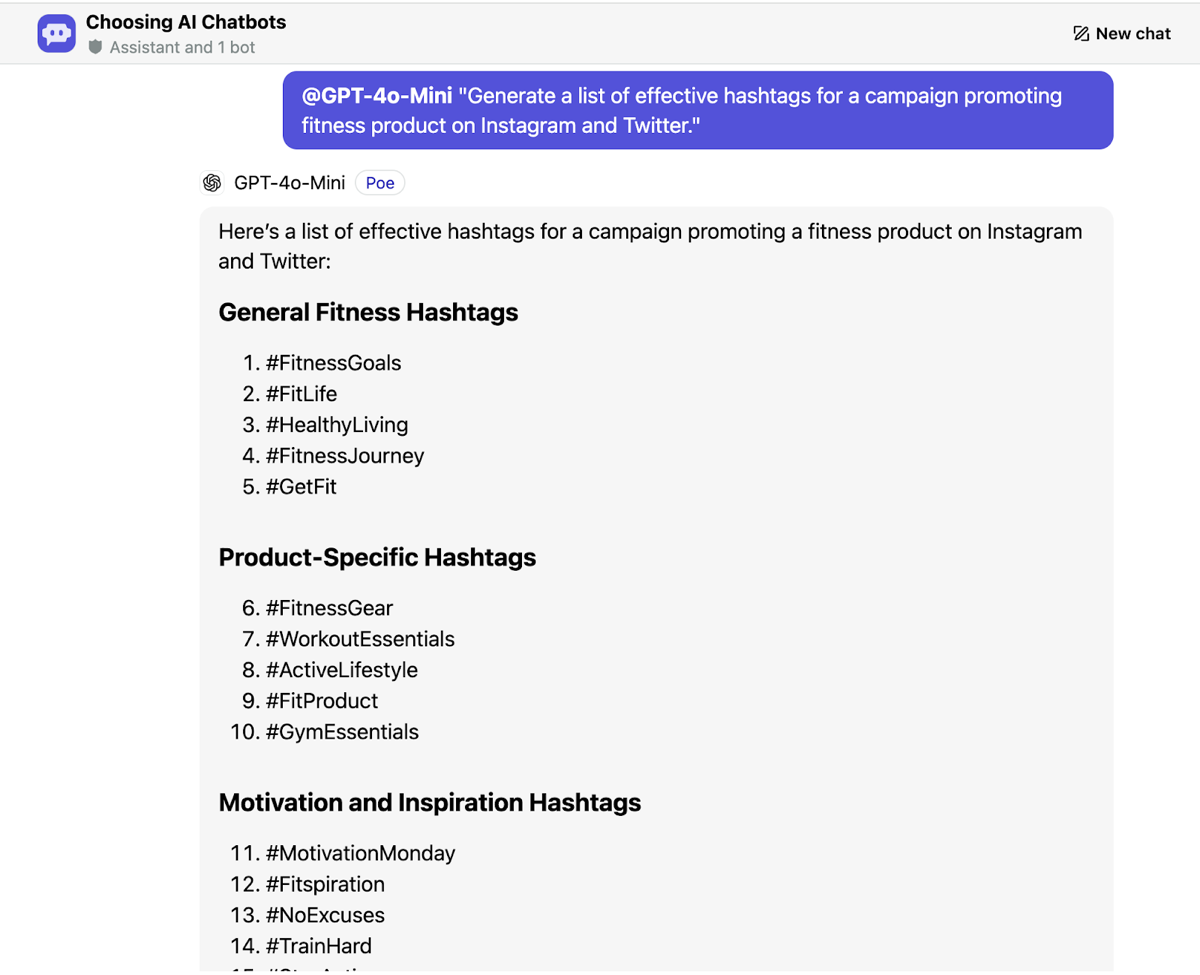
Name the platform, because length and tone differ, and paste two or three of your own posts that performed well so the model can match your voice. Without that, a hashtag prompt returns the tags any fitness brand would get, as the screenshot shows.
- Content calendar: “Using this product announcement and these three customer quotes: [paste], plan four weeks of LinkedIn posts for [business type]. For each post give the angle, the hook and the call to action. Do not invent quotes.”
- Captions: “Write five Instagram captions for [product], each under [N] words, in the same voice as these posts: [paste]. No hashtags.”
- Hashtags: “Suggest eight Instagram hashtags for [product]: three broad, three niche and two branded. Skip any tag with an unrelated or negative meaning.”
- Analytics review: “Here is last month’s exported post data: [paste]. Which three posts did best on [metric], what do they have in common, and what should we test next? Say when the sample is too small to conclude anything.”
Sample AI prompts for image production
Describe the picture the way you would brief a photographer: subject, setting, light, angle, style and aspect ratio, plus what must not appear. Check every word of any text the tool renders, or add the text yourself afterwards.
- Product photography: “A [product] on a [surface] in soft window light, shot from slightly above, shallow depth of field, neutral background, 4:5 vertical. No people, no text, no logo.”
- Social media graphic: “A square promotional graphic for [sale] in [brand colors], with a large empty area on the left for text and simple geometric shapes. No text in the image.”
- Mood board: “A mood board for a cozy coffee shop: warm wood, soft lighting, ceramic cups, plants. Add a palette of five hex colors and three furniture styles as a list.”
- Visual storytelling: “Six images for a story about sustainability, with the same character, art style [style] and palette in all six. Describe each frame in one line first so I can approve the sequence.”
Sample AI prompts for video production
Give the runtime and the narration word count, supply the source material, and check anything the draft states as fact.
- Explainer video: “Write a 2-minute explainer script, about [N] words of narration, for [product]. Audience: [who]. Cover only these three points: [list]. Mark where a screen recording replaces narration.”
- Product demo: “Outline a 3-minute product demo of [product] for a [role], in the order they would use it, one feature per minute. Use only the features listed here: [paste].”
- Testimonial: “Here is the transcript of a customer interview: [paste]. Storyboard a 60-second testimonial using only what they said, in their words. Do not add or change any quote.”
- Educational series: “Outline a five-episode series on [topic] for [audience]: one outcome per episode, the key points, and the visual that shows each point.”
Frequently asked questions about AI prompts
How long should an AI prompt be?
As long as a new colleague would need to do the task without asking you questions. A one-line prompt is fine for a one-line task; a prompt for an ad or a report usually needs the audience, the facts, the format and the limits.
Can I reuse the same prompt?
Yes. Keep each prompt with one output you accepted, and next time change only the bracketed facts. Paste the accepted output as the example.
How do I know if a prompt is working?
Run it on three different inputs. If each output needs only light edits, it works. If you keep making the same fix, put that fix into the prompt.
Does the same prompt work in every AI tool?
Usually close, not identical. Tools respond differently to the same wording, so test the prompt in each tool you use before relying on it.
Try it on one real task
Take one task you did by hand this week, such as last month’s ad or a blog brief, and rewrite its prompt with the facts, the limits and the exclusions above. Run it in one of your AI tools, compare the result with what you wrote, and keep the prompt and the output you accept together for next time.
An AI agent that works inside your Slack threads
Kipwise Agent answers in the thread, as you, so the answer stays where the question was.
- “Do we have a doc about this?” — it searches your knowledge base, reads the page, and answers with the relevant part and a link to the source
- “Can someone write this up?” — it drafts a page from the thread, files it in the folder you name, publishes it and posts the link
- “Post this to the channel” — it shares a page into a Slack channel you name
- “Every week, summarise…” — it runs a request on a schedule and posts the result where the team will see it
It only ever sees the pages you can see, and everything it writes in Kipwise is attributed to you.